Audio to MIDI converter
Audio to MIDI
Drop in a song, a loop or a voice memo, or record straight from your DAW. Out comes MIDI for every instrument in it, ready to drag onto a track.
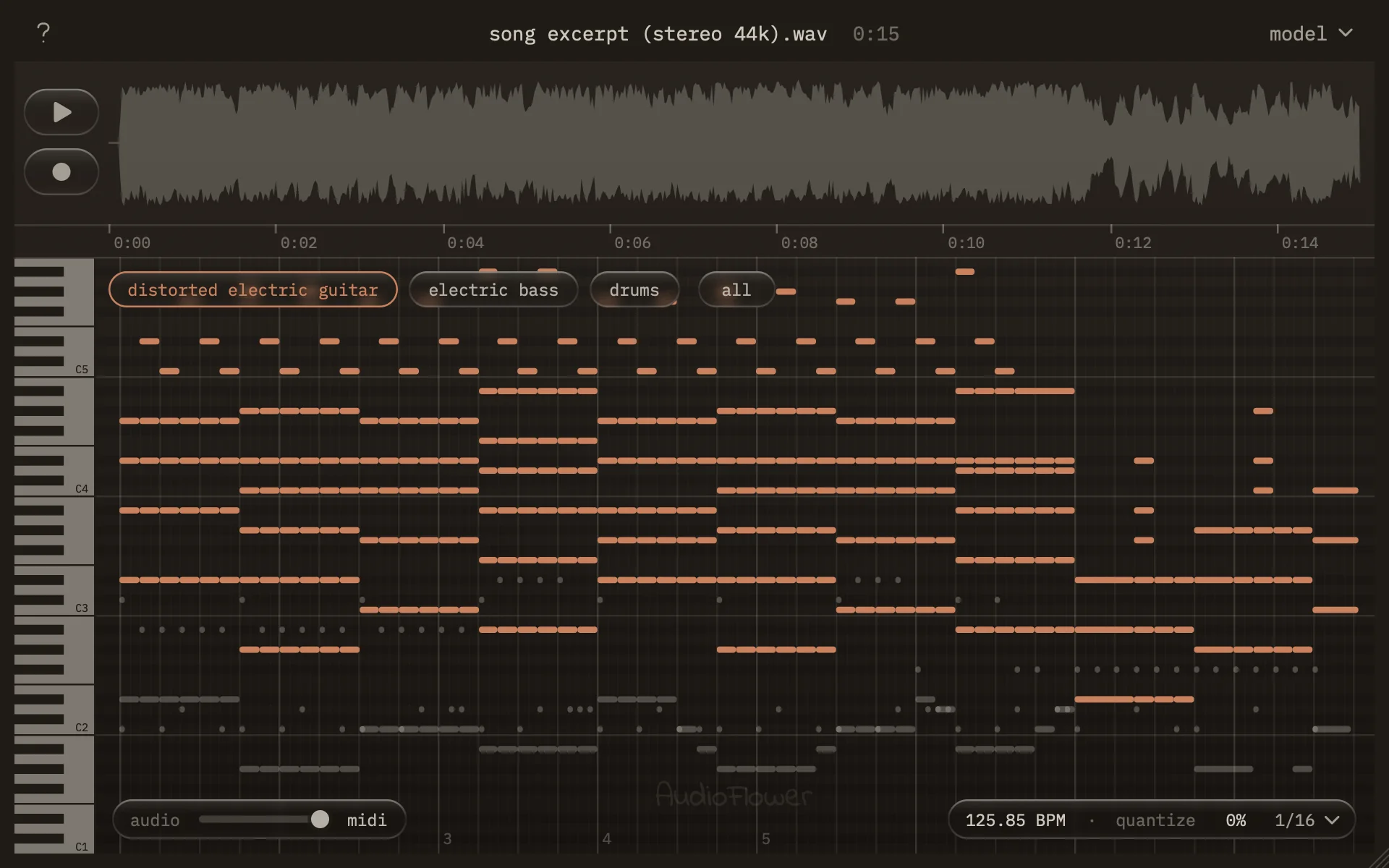
Audio to MIDI converter
Drop in a song, a loop or a voice memo, or record straight from your DAW. Out comes MIDI for every instrument in it, ready to drag onto a track.
Listen
Fourteen seconds of a song, and the notes Audio to MIDI wrote down for it, played back through its preview instruments. Slide between them the way you would in the plugin.
How it works
Drop any audio file on it, up to 15 minutes. Or put it on a mixer track, press record, and play your synth, guitar or voice in.
Every instrument it hears becomes its own layer: piano, bass, drums, a sung melody. It finds the tempo and lines the notes up with the bars.
Drag a layer onto a track for its MIDI, or "all" for every instrument at once. A recording's MIDI lands on the bar it was played at.
Specifications
| Input | WAV, AIFF, MP3, M4A, FLAC, OGG and more, up to 15 minutes, or a recording from your DAW |
|---|---|
| Output | A MIDI file per instrument, or one file with a track for each; drums on channel 10 |
| Timing | Tempo detected (or taken from your DAW when you record), quantize 0–100% to 1/4, 1/8 or 1/16 |
| Listening | A preview that plays the notes through real instruments (GeneralUser GS), with a fader back to the original |
| Transcription | Runs on your Mac, on its graphics chip. Three model sizes: fast (210 MB), balanced (620 MB), best (2.7 GB), each downloaded once |
| Formats | Audio Unit and VST3 effect, plus a standalone app — macOS 11 or later, Apple Silicon |
| Not included | No Windows, no Intel Macs, no AAX, no note editing; every note plays at the same velocity |
Installing
Signed and notarized by Apple, so it installs without a warning. Choose the Audio Unit, the VST3, the app, or all three.
Four steps, no account
Open Audio-to-MIDI-1.0.0.pkg and follow the installer. The plugins go to /Library/Audio/Plug-Ins, the app to Applications, and the preview's instruments (32 MB) alongside.
Restart your DAW, or run its plugin scan. Audio to MIDI is an effect: look for it under AudioFlower in your effects, not your instruments.
Put it on a mixer track and drop a file on it. Or open the app on its own. The first time, it downloads the transcription model (620 MB, just this once) and starts by itself when that's done.
Drag the MIDI out. Onto a track in your DAW, or right-click a layer to save it as a file.
Questions
It's free: no account, no license key, no trial. The plugin's own code is open source.
The transcription model it downloads, MuScriptor by Kyutai and Mirelo, is licensed for non-commercial use (CC BY-NC 4.0), and that applies to Audio to MIDI as a whole. Only transcribe audio you have the rights to.
No. Transcription runs entirely on your Mac. The only thing it downloads is the model itself, once, the first time you use each size.
Clear parts in a well-mixed song come out close to right; dense mixes and effects-heavy sounds less so, and it sometimes names an instrument wrongly (a synth heard as a guitar). The pitches and timing are the useful part: treat the result as a fast first draft you tidy in your DAW. The "best" model is the most accurate and the slowest.
So it can sit on a mixer track and record what plays through it: a hardware synth, a guitar, a vocal. Dropping a file works on any track.
Any macOS host that loads Audio Units or VST3: Logic Pro, Ableton Live, FL Studio, Reaper, Studio One, Cubase, Bitwig and others. Pro Tools only loads AAX, and there's no AAX build. The app works without a DAW at all.
The transcription runs on the graphics chip in Apple Silicon Macs. On an Intel Mac it would be several times slower, so it isn't offered there.
Delete /Library/Audio/Plug-Ins/Components/Audio to MIDI.component, /Library/Audio/Plug-Ins/VST3/Audio to MIDI.vst3 and the app in Applications. The models and preview instruments are in ~/Library/Application Support/AudioFlower and /Library/Application Support/AudioFlower.
Audio to MIDI is on GitHub under the AGPLv3, like EQ. You can read exactly what it does and build it yourself.
The transcription model is MuScriptor by Kyutai and Mirelo, running on muscriptor.cpp by Damien Ronssin. The preview plays through GeneralUser GS by S. Christian Collins, using TinySoundFont by Bernhard Schelling. The full list is in the app's quick guide and in the source.
Email luke@audioflower.art with your DAW, your macOS version, and what you were doing.
Want an email when there's an update, or when the next plugin lands?